
LPB Piso WiFi 10.0.0.1: Login & Pause Time
LPB Piso WiFi is the most widely used software platform for running a piso wifi business in the Philippines. If you have seen a coin-operated WiFi machine at a sari-sari store, boarding house, or waiting area, there is a good chance it is running LPB. The platform handles everything from customer session management to GCash payments, voucher generation, remote monitoring, and the admin panel at 10.0.0.1 where operators control the machine.
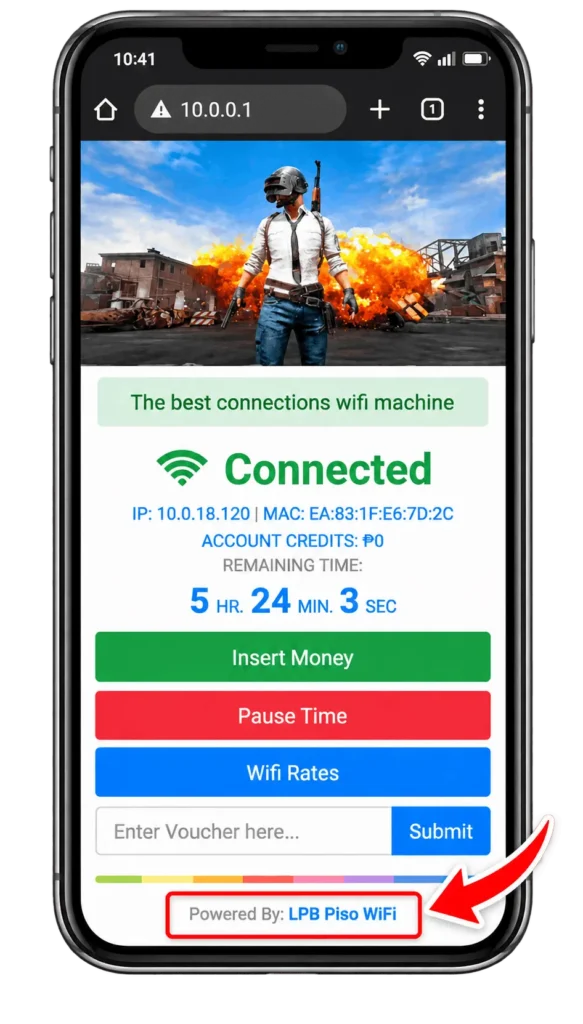
What Is LPB Piso WiFi?
LPB Piso WiFi is a software platform. It is not a router brand, not an internet service provider, and not a complete machine you buy in a box. The software turns compatible hardware into a WiFi vending machine that sells prepaid internet access to customers through coins, vouchers, or cashless payments.
The business category is called piso wifi. LPB is one of the platforms used to run it. When someone buys an LPB license, they are buying software. The hardware, the router, and the internet connection from an ISP all need to be sourced separately unless they buy a pre-configured unit from a supplier who handles the full setup.
LPB is developed and maintained by a Philippine team. The platform has a dedicated Facebook support group with over 160,000 members as of 2026, which is the largest community of any piso wifi platform in the country.
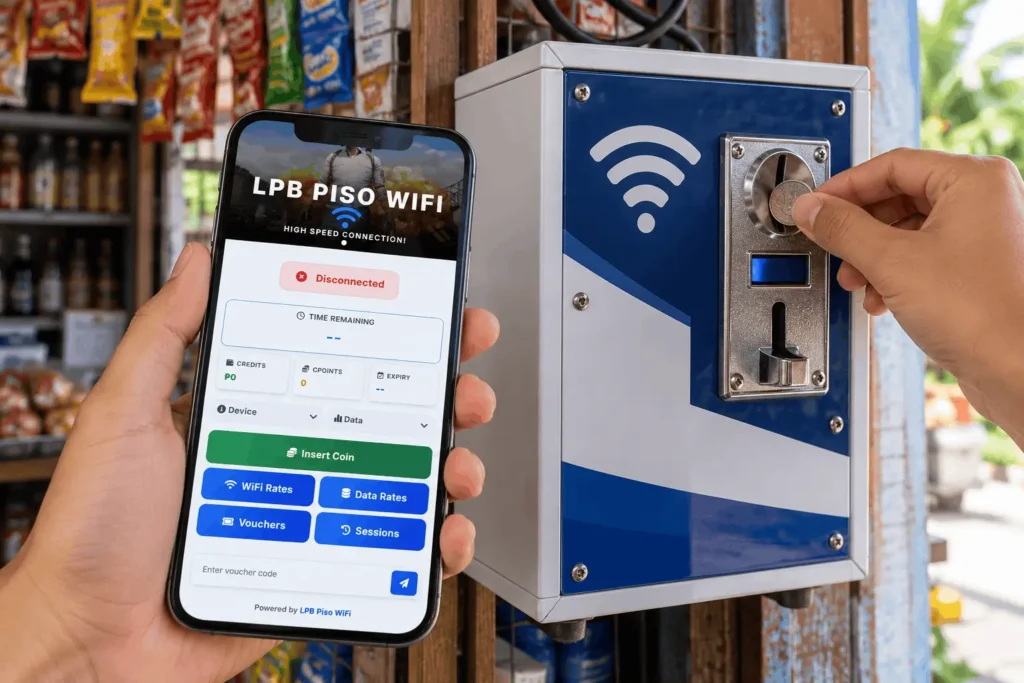
How Customers Use LPB Piso WiFi 10.0.0.1
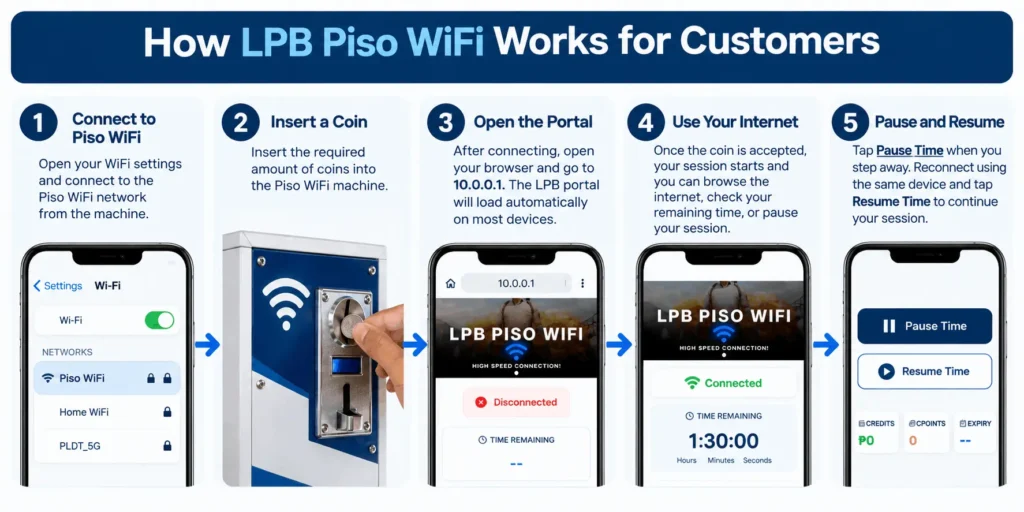
From a customer’s point of view, using a piso wifi machine running LPB is straightforward.
They connect their phone to the WiFi network shown on or near the machine. The portal at 10.0.0.1 opens either automatically as a captive portal notification or manually when they type the address in their browser. From that page they can insert a coin into the physical machine slot, enter a voucher code, or pay through GCash or Maya if the operator has those enabled.
Once payment is accepted, the session starts and the customer has internet access.
Features of 10.0.0.1 LPB Piso WiFi
LPB Piso WiFi Pause Time
Pause time lets customers freeze their session timer so unused credits are not lost when they step away. It is one of the main reasons operators choose LPB. Session time is stored in the LPB Cloud, so remaining credits sync across LPB machines.
Pause time is built in but must be enabled by the operator in the admin panel under Session Settings.
GCash and Maya Payments
LPB Piso WiFi supports GCash and Maya as cashless payment options. This is available on the Premium license only. Setting it up requires a GCash for Business or Maya Business account, which must be applied for separately through those providers before you can activate the integration in your admin panel.
Cashless payments remove the need for customers to have exact change and expand your potential customer base to people who do not carry coins.
Voucher Codes
Voucher codes are alphanumeric codes a customer types into the portal instead of inserting a coin. You generate them in batches from the admin panel, set a time or data value per code, set an expiry window, and print them on slips or cards to sell at your location or nearby stores.
To set up vouchers on LPB: go to the admin panel, open the Vouchers tab, create a new batch. Set the time value per code, set an expiry window (seven days is standard for printed batches), and generate the codes.
Bandwidth Management
LPB includes per-user speed limits, data caps, traffic priority, and smart queue management. These tools let you set a fair usage policy so one heavy user does not consume all available bandwidth and slow down everyone else on the same machine.
These settings are configured in the admin panel. Set speed limits that match your ISP plan divided by the typical number of active users at peak hours. If your plan is 100 Mbps and you typically have 20 simultaneous users, a 5 Mbps per user limit is a reasonable starting point.
Remote Management
LPB includes remote monitoring and administration tools built into the platform. You can check machine status, active sessions, earnings, and connectivity without being physically present at the location. This reduces the number of site visits needed and lets you respond to issues faster.
Remote management does not replace physical maintenance. Hardware failures, power interruptions, coin slot jams, and ISP outages still require someone on-site.
Multiple Vending Points
A single LPB installation can support multiple sub-vending units under one machine using VLAN-based network separation. This is useful for operators who want to cover more physical area or serve multiple rooms or floors from one central hardware setup.
Other Features
LPB also supports a built-in PPPoE server for monthly account-based subscribers, e-loading and cash-in services from the machine, computer rental through the native Piso Net app, and customizable portal branding with your own colors, logo, and layout.
These are optional features. Not every operator needs or uses all of them. The core business for most operators is time-based prepaid access through coins and vouchers.
LPB Piso WiFi Admin Panel at 10.0.0.1
The admin panel for LPB Piso WiFi is accessed at 10.0.0.1/admin from any device connected to the same network as the machine. You need your admin username and password to log in.
The commonly reported factory default for LPB Piso WiFi 2.0 is username admin and password 123456789. This is based on community setup guides and forums rather than official LPB documentation, so if these do not work your credentials were either set during installation or changed by your supplier. Change the default password immediately after your first login.
From the admin panel you can manage session settings, rates, vouchers, payment integrations, bandwidth controls, connected devices, and your license. The panel also gives you access to earnings reports and transaction logs.
To change your admin password on LPB: go to Settings, then Admin Account, enter your current password and set a new one.
To change your WiFi network name (SSID): go to Network Settings, find the SSID field, type the new name, and save. The router restarts briefly and the network reappears under the new name.
Common LPB Piso WiFi Typos and Search Errors
Many users reach this page after a search that did not load because of a small typing mistake. These are the most common ones.
Brand Name Misspellings
The correct name is LPB Piso WiFi, not:
This section is for operators who manage LPB machines. Everything below applies to the admin panel, not the customer portal.
LPB Piso WiFi Hardware Requirements
If you are buying a ready-made piso wifi setup, the hardware is already handled. This section is for those building a DIY setup from scratch.
LPB Piso WiFi 10.0.0.1 runs on specific hardware. Not every router or computer supports it. The officially listed compatible hardware as of 2026 includes:
If you are building your own setup (DIY), you select one of these as your main board and connect it to a coin acceptor, a power supply, and an access point. If you are buying a ready-made unit from a supplier, the hardware choice has already been made for you.
For DIY builders, the Raspberry Pi 4 and Orange Pi 5 are the most commonly used boards because of their availability in the Philippines, community support, and reliable performance under continuous load. The Raspberry Pi 3 works but is slower for high user counts.
Routers like the Newifi D2 offer an all-in-one option where the board and wireless hardware are integrated, but upgrading later is harder. Single-board computers give you more flexibility to swap components.
LPB Piso WiFi License Plans
LPB sells software licenses only. Hardware, installation, and your ISP subscription are not included in the price.
|
Plan |
Promotional Price |
Regular Price |
Duration |
Users |
|---|---|---|---|---|
|
Lite |
₱250 |
₱400 |
1 year |
50 users (offline users excluded) |
|
Premium |
₱500 |
₱700 |
1 year |
Unlimited |
|
Lifetime (LPB 2.0) |
₱900 |
₱1,500 |
Lifetime |
Unlimited |
The Lite plan covers one sub-account and a 50-user software limit.
The Premium plan covers unlimited users, unlimited sub-accounts, unlimited PPPoE accounts, and includes GCash and Maya payment integration.
One important detail: If you intend to buy the lifetime plan, confirm in writing what version, entitlements, and upgrade terms are included before paying. The license is machine-bound and non-refundable once activated.
For a new operator setting up one machine, the Premium annual plan at ₱500 is the practical starting point. The lifetime plan makes financial sense for an operator who is confident in their location and hardware and plans to run the machine for more than two years.
Starting a Piso WiFi Business with LPB
The Market Opportunity
According to the Philippine Statistics Authority’s 2024 survey, 48.8% of Filipino households had home internet access, up from 17.7% in 2019. That growth is real, but it also means more than half of households still do not have home internet. Many rely on mobile data, which is per-gigabyte prepaid spending, not a fixed monthly plan.
Piso wifi addresses a different need: people who are near a machine and want internet for a short period without committing to a monthly subscription or burning through their mobile data. The typical customer is a student, a commuter, a boarder, or a visitor who needs 15 to 60 minutes of browsing. The machine meets them where they are, at a price they can decide on in real time.
Best Locations for LPB Piso WiFi
LPB and operators consistently identify the following location types as high-traffic for piso wifi machines:
Location is the single biggest factor in daily revenue. A machine in a high-foot-traffic spot with no nearby competitor can earn significantly more than the same machine in a low-traffic area. Before buying hardware, visit the intended location at different times of day and observe actual foot traffic.
Real Costs to Budget
The price of the LPB license is not the cost of starting a piso wifi business. The full budget needs to cover:
Hardware (single-board computer or router, coin acceptor, power supply, casing, access point): ₱3,000 to ₱10,000 depending on whether you buy components or a pre-assembled unit.
LPB license: ₱250 to ₱900 depending on the plan.
ISP subscription: a monthly cost, typically ₱1,299 and up for a plan fast enough to serve multiple simultaneous users.
Electricity: continuous operation adds to the monthly bill.
Site rental or arrangement with the store owner if the machine is placed in someone else’s location.
Maintenance and occasional component replacement.
Evaluate the business on cash remaining after all costs, not on coins collected. A machine that collects ₱500 a day but costs ₱400 a month in broadband, ₱200 in electricity, and ₱150 in site rent is not the same business as one that collects ₱500 a day with lower overhead.
Legal Considerations
Two things operators frequently overlook:
First, most ISP residential plans prohibit commercial resale of the internet connection. PLDT’s published terms require prior written consent for commercial resale of service. Globe has similar restrictions.
Using a residential plan to run a commercial piso wifi machine technically violates the terms. Some operators use business broadband plans to avoid this. Confirm your ISP’s terms before operating commercially.
Second, depending on scale and location, piso wifi machines may fall under barangay business permit or DTI registration requirements. Check with your local government unit before setting up.
LPB Piso WiFi Risks to Know Before You Start
Platform dependence. LPB does not guarantee uninterrupted availability. If the LPB platform has an outage, payment acceptance, session management, and remote access can be affected. Ask your supplier or LPB support what happens to active customer sessions and coin crediting during a platform outage before you depend on it commercially.
Power and physical reliability. The machine runs continuously. Power interruptions, hardware damage, theft, and ISP outages will happen. A UPS (uninterruptible power supply) reduces the impact of brief power cuts. Equipment insurance is worth considering for higher-value setups.
License terms. The license is machine-bound. If the board fails, transferring the license to new hardware requires verification and approval from LPB. Keep documentation of your hardware and license purchase. A board failure without a clear transfer path means waiting for LPB support response before the machine can operate again.
ISP resale permissions. As noted above, confirm your ISP’s terms. Operating commercially on a residential plan creates a risk of service termination.
FAQs About LPB Piso WiFi
Conclusion
LPB Piso WiFi 10.0.0.1 is the dominant platform in the Philippine piso wifi market for a practical reason: it is what most suppliers install, most community members use, and most online guides cover. For a first-time operator, that ecosystem advantage is real. Peer support, troubleshooting resources, and pre-configured hardware availability are all easier to access with LPB than with any other platform.
The license is affordable. The features cover everything a standard piso wifi operation needs. The admin panel at 10.0.0.1/admin gives full control over rates, sessions, vouchers, payments, and bandwidth from one interface.
The business itself succeeds or fails on location, pricing, and consistent uptime, not on which platform is installed. Choose a good spot, price competitively for your area, keep the machine running reliably, and the software handles the rest.
If you want to understand how the 10.0.0.1 piso wifi pause time feature works, or how to access the piso wifi login portal, read our detailed guides on those topics.